

A new website that looks better but sends you fewer enquiries is one of the most common and most avoidable mistakes local businesses make. A redesign changes URLs, page text, menus and code, and those are the things Google uses to decide where you appear. If you plan the redesign around what already works, you keep your rankings, your place on Google Maps and your phone ringing. If you leave SEO until after launch, you are usually fixing damage.
This guide shows you what to record before you start, what to protect during the build, how to handle redirects, what to check on launch day and what to do if the redesign comes with a rebrand.
Key Takeaways
- Record everything before you touch the site: every URL, its traffic, its inbound links and your rankings for the last 12 months.
- Keep the pages that bring customers, and redirect every old URL to its closest new equivalent, never everything to the homepage.
- Keep permanent redirects live for at least a year, and for as long as you can after that.
- Update your Google Business Profile website link on launch day, and think carefully before changing the business name.
- Expect some ranking movement for a few weeks after launch, and monitor it weekly instead of reacting to day-one numbers.
Table of Contents
- Why a redesign puts your SEO at risk
- Step 1: Audit and record the current site
- Step 2: Protect structure, content and URLs
- Step 3: Build on a staging site, not on the live one
- Step 4: Map and test your redirects
- Step 5: Launch and the first 30 days
- Protecting your Google Maps visibility
- SEO after a rebrand
- Our perspective
- Redesign with SEO built in
- A practical timeline
- Common mistakes to avoid
- FAQ
- Sources
Why a redesign puts your SEO at risk
Search engines do not rank your design. They rank pages: each URL, with its text, its internal links and the links other sites point at it. When a redesign changes a URL, deletes a page or rewrites a heading, Google has to crawl the new version, understand it and decide again where it belongs.
Google itself says that on a medium-sized site, ranking fluctuations after a site move can last a few weeks or more while it recrawls and reindexes your URLs. That is normal. What is not normal, and what you can prevent, is a permanent drop caused by broken redirects, deleted pages or content that was thinned out to make the layout cleaner.
For a local business the stakes are higher than for a large brand, because you usually depend on a small number of pages. Think of a dental clinic whose “implants in Valencia” page brings most of its first-visit enquiries, or an estate agency whose “sell your flat in Málaga” page captures owners. Lose one of those pages in a redesign and you feel it in the diary within weeks.
There is also a second visibility channel to protect: Google Maps. Your map ranking depends on your Business Profile, reviews and proximity, but your website is the destination the profile links to. If that link breaks or lands on an irrelevant page, you waste the traffic your profile earns.
Step 1: Audit and record the current site
Before the designer opens a single mock-up, you need a baseline. Without one you cannot tell whether the new site is better or worse, and you cannot fix what you cannot measure.
What to export
- A full URL list. Crawl your site and export every indexable address, with its title, heading and status.
- Traffic per page. From Google Analytics and Search Console, pull the last 12 months of organic visits, clicks and impressions for each URL.
- Rankings. Save your positions for the searches that matter: service plus city, “near me” searches and your brand name.
- Inbound links. Note which pages other sites link to. Those pages carry authority you do not want to lose.
- Conversions. Record which pages lead to calls, WhatsApp clicks, form submissions and booking requests.
Storing 12 months, not just last month, shows you seasonality. A restaurant’s terrace page or a hotel’s summer offers will look weak in November and strong in June, and you should not delete something that is merely out of season.
Sort pages into three groups
Once you have the data, give each URL a verdict:
| Group | What it looks like | What to do in the redesign |
|---|---|---|
| Protect | Brings traffic, enquiries or links | Keep the URL and the core content; improve, never thin out |
| Improve | Has impressions but weak clicks or conversions | Keep the URL; rewrite for clarity and intent |
| Retire | No traffic, no links, duplicate or outdated | Merge into a stronger page or remove, with a redirect |
Be careful with the third group. Removing pages that look minor can cause significant traffic losses if those pages held organic value or backlinks. Check before you cut.
Step 2: Protect structure, content and URLs
The safest redesign changes the look and leaves the skeleton alone. Designers often want to simplify menus and shorten text, which is reasonable, but it needs an SEO check first.
Keep URLs where you can
If a page already ranks at /dentista-valencia, the best new URL is /dentista-valencia. Changing the platform or theme does not require changing addresses. Every URL you keep is a redirect you do not need to get right.
When a URL must change, for example because the old structure was a mess, change it once, deliberately, and document it.
Keep the words customers search for
A common pattern: the old page has 600 words explaining a treatment, with the city, the neighbourhood and the questions patients ask. The new design shrinks it to three lines and a large photo. The page is now a different page in Google’s eyes. Keep the substance, and use design (tabs, accordions, short sections) to make it easy to read rather than to cut it. Our guide to on-page SEO factors covers what each page needs: titles, headings, internal links and content that matches intent.
Check your keyword map
Each important page should target one clear search. If you merge three service pages into one “Services” page, you stop competing for three searches and start competing weakly for one. Before you approve the sitemap, review it against your keyword research so that every search that brings customers still has a page of its own.
Do not forget what is not visible
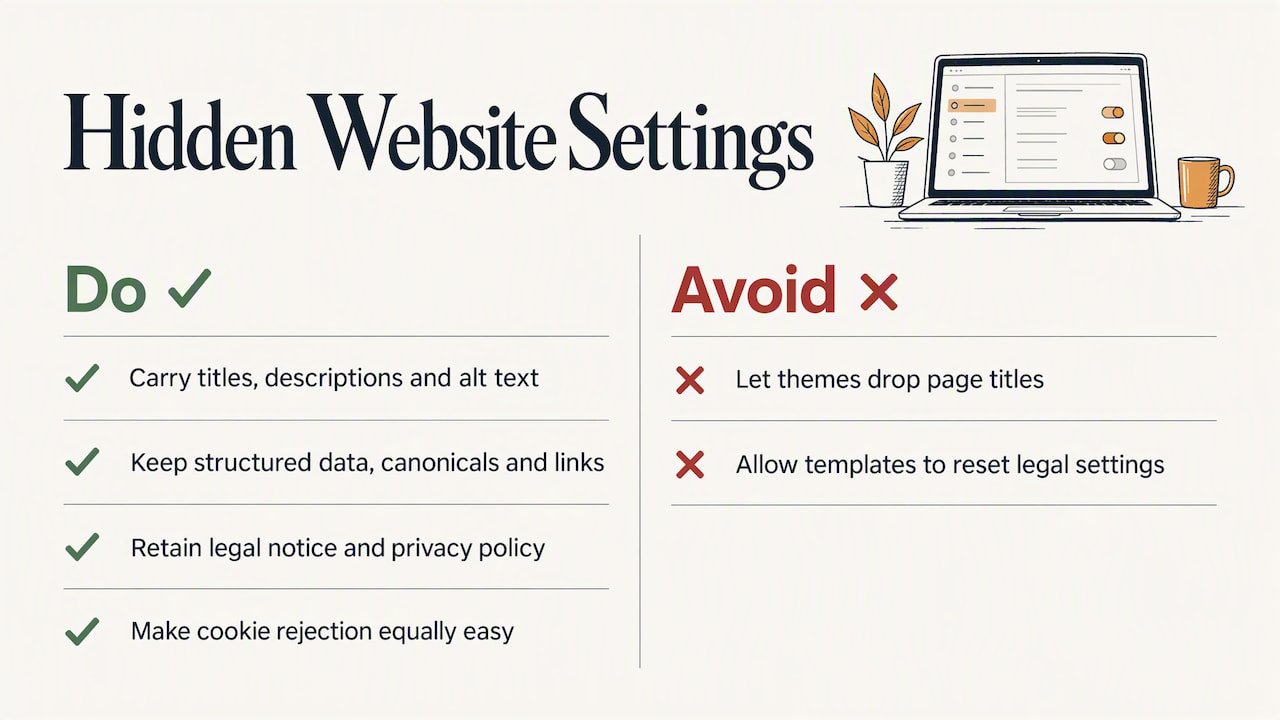
Titles, meta descriptions, image alt text, structured data, canonical tags and internal links all live in the template or the page settings. Make sure the new build carries them across. A theme that quietly drops your page titles can cost you more than any design choice.
In Spain, also make sure the new site keeps its legal notice, privacy policy and a cookie banner that lets visitors reject non-essential cookies as easily as accept them. Templates often reset these. If you are unsure, check the wording with your legal adviser or data protection contact.
Step 3: Build on a staging site, not on the live one
Develop the new site on a private copy that search engines cannot index. Block it with a password rather than relying on robots.txt alone, so it never competes with your live pages.
On staging you can test the things that are expensive to fix later:
- Speed and Core Web Vitals. Test Core Web Vitals and mobile-friendliness before launch, not after. Most local searches happen on a phone, often on mobile data.
- Mobile layout. Phone number tappable, address visible, opening hours readable without zooming.
- Internal links and menus. No dead ends, no orphan pages.
- Forms and WhatsApp buttons. Test that they reach you.
- Tracking. Analytics, Search Console and conversion events installed and firing.
A staging build also lets you load the redirect map and test it before any visitor or Googlebot sees it.
Step 4: Map and test your redirects
Redirects are the single most important technical task in a redesign. A 301 (permanent) redirect tells browsers and Google that an old address now lives at a new one, and that its value should move with it.
Rules that protect your rankings
- One old URL, one closest new URL. Match each old page to the new page that answers the same need.
- Never send everything to the homepage. It confuses users and wastes the signals the old page earned. Where a page has no equivalent, use a useful alternative page or return a 410 (gone) status.
- Avoid chains. Old A to B to C slows crawling. Point A straight to C.
- Test the full list. Run every old URL through a crawler on staging and again after launch, and check each returns the right destination with a single hop.
- Keep them. Google advises keeping permanent redirects for as long as possible, generally at least one year, so it can transfer signals to the new URLs. For visitors who have bookmarked or been linked to an old page, keeping them indefinitely is best practice.
A simple redirect map
| Old URL | Verdict | New destination |
|---|---|---|
| /tratamientos/implantes.html | Protect | /implantes-dentales-valencia |
| /blog/2019/consejos-verano | Retire, has links | /blog/cuidado-dental-verano |
| /oferta-navidad-2018 | Retire, no value | 410, or the main offers page |
| /contacto.php | Protect | /contacto |
Keep this as a spreadsheet. It is also your checklist for the post-launch crawl.
Step 5: Launch and the first 30 days
If your site is small or medium, Google recommends moving it all at once; only large sites benefit from moving in sections. Google also suggests changing one thing at a time where possible, and timing the move for a quieter period. For a restaurant, that is not the week before Christmas. For a tax adviser, it is not the weeks before a filing deadline. For a hotel, it is outside peak booking season.
Launch-day checklist
- Remove the password and any noindex tag from the new site.
- Switch on the redirects and test a sample of old URLs, starting with your top 20 pages.
- Submit the new sitemap in Google Search Console.
- Check robots.txt does not block the site.
- Confirm canonical tags point to the new URLs.
- Update your Google Business Profile, social profiles and directory listings with the new website address.
- Check forms, phone links and tracking.
The weeks after launch
Crawl the live site in the first week, then again at week two and week four. Compare Search Console clicks and impressions with the baseline you saved. Look for pages that have lost visibility, 404 errors, redirect chains and pages that Google has excluded from the index.
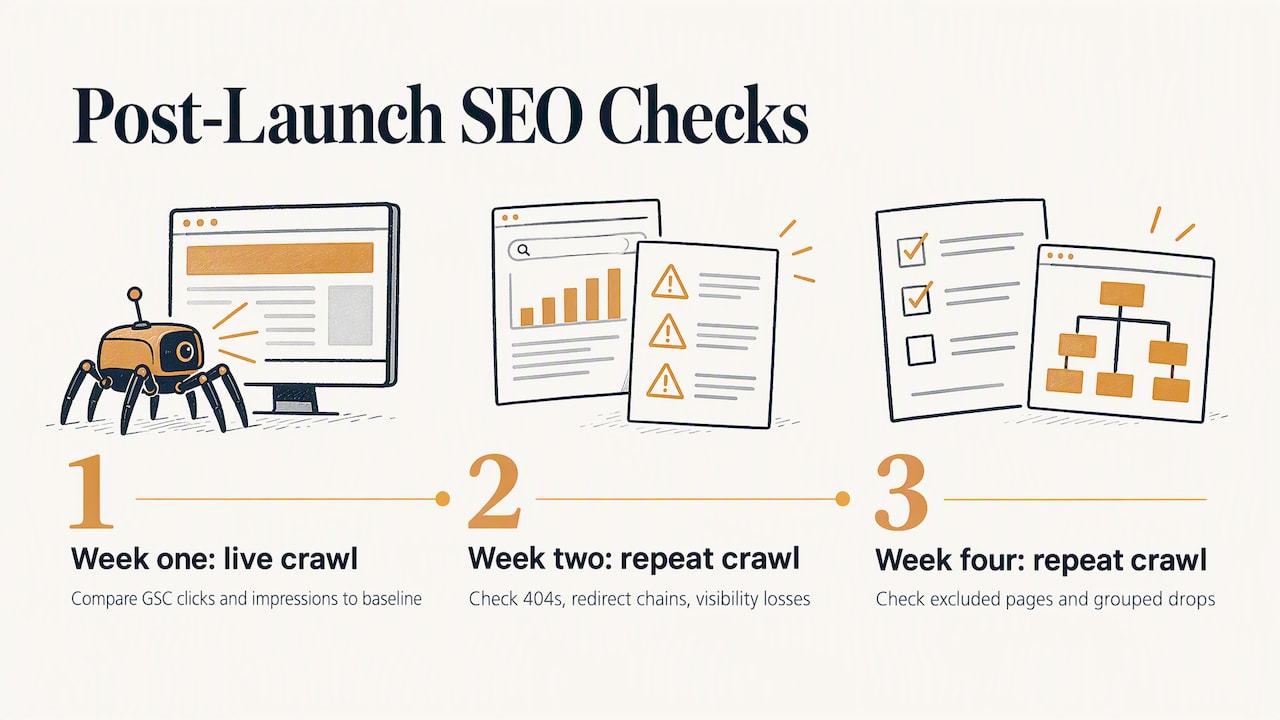
Small dips are normal while Google reprocesses the site. Act on patterns: a group of pages dropping together usually points to a template or redirect fault, not to Google’s mood. Fix the cause, then wait; making ten changes at once makes it impossible to see what worked.
Protecting your Google Maps visibility
For businesses that live on “near me” searches, the map pack matters as much as the organic results. A redesign touches it in three ways.
The website link. Your Business Profile points to a URL. If that URL now redirects through several hops or lands on a generic page, update it to the exact new address, ideally the page that best matches the profile. Our guide on how to rank on Google Maps in 2026 explains how the profile, reviews and website work together.
NAP consistency. Name, address and phone number on the new site should match your profile and directories exactly. Redesigns often introduce small differences: a new phone format, an abbreviated street name, a missing postcode.
Google-built websites are gone. If your only site was the one created inside Google Business Profile, note that those websites were turned off on 5 March 2024. If you want a website, you have to build it elsewhere and add its address to your profile.
If you manage a clinic, our article on using Google Business Profile for local clinics shows how to make the profile do more of the work.
SEO after a rebrand
A rebrand adds another layer: new name, new logo, perhaps a new domain. Each has consequences.
New domain
A domain change is a site move. Everything above applies, and you should also use Google’s Change of Address tool in Search Console and keep the old domain registered and redirecting. Follow Google’s site move guidance step by step.
New business name on Google
Be careful here. Google’s guidelines allow a rebrand of a Business Profile only when the change is minor, keeping the same proper nouns, services and category. If the new name is a genuinely different business identity, the old profile must be marked closed and a new one created, which means starting again with reviews and history. Before you change anything on the profile, compare the old and new names against those guidelines, and decide whether the brand change is worth that cost.
What to update after a rebrand
- Website titles, headings, footer and structured data.
- Google Business Profile name, description, logo and photos, within the rules above.
- Directories, chambers of commerce, trade associations and local press mentions.
- Backlinks: ask the sites that link to you to point to the new address and name.
- Review replies and any templates that use the old name.
Keep the old name visible for a period (“formerly…”) on your About page so customers and search engines can connect the two. Our article on local link building shows practical ways to get neighbourhood sites to update their links.
Our perspective
We see the same pattern again and again: a business invests in a beautiful new site, launches it, and three weeks later wonders why the phone has gone quiet. The design was fine. Nobody protected the pages that were earning customers.
Our view is that a redesign is an SEO project that happens to include design, not the other way round. We work across the website, Google Maps, reviews and visibility in AI answers as one system, so a change to the site is never made in isolation from the profile and the reputation that sit around it.
We do not promise positions, because nobody honestly can. We commit to the work: a baseline before the build, a redirect map you can read, a launch checklist and verifiable monthly reports afterwards, so you can see what moved and why. And we keep a limited portfolio of clients so that someone who knows your business is looking at your data.
If you are about to redesign or rebrand, the cheapest moment to involve SEO is before the brief is written.
YellowRock
Redesign with SEO built in
If you are planning a new site, we can build it with this process from day one. Our Diseño Web subscription costs €99 per month, and it works alongside our SEO plans so the site is designed around the searches your customers actually use.
If the site is only part of the problem, our Crecimiento Inteligente plan covers the ongoing work on Google, Maps and review management, and you can see everything we offer on our services page. If you would like to know where you stand before you change anything, ask us for a free Google visibility analysis, at no cost and with no commitment, by WhatsApp through our website.
A practical timeline
Here is a realistic sequence for a small local business site of 20 to 60 pages.
| Stage | What happens | Typical owner involvement |
|---|---|---|
| Weeks 1 to 2 | Crawl, export data, choose pages to protect, agree keyword map | Approve priorities, give access to Analytics and Search Console |
| Weeks 3 to 6 | Design and build on staging, carry across titles, text and tags | Review copy, supply photos and reviews |
| Week 7 | Redirect map loaded and tested, speed and mobile tests, legal pages checked | Sign off |
| Launch day | Go live, submit sitemap, update Business Profile and listings | Be reachable |
| Weeks 8 to 12 | Weekly crawls, compare with baseline, fix errors | Review the report |
The durations will vary with the size of the site and how quickly content is approved. What should not vary is the order: data first, build second, test third, launch last.
Common mistakes to avoid
- Launching with noindex still on. A staging setting carried to the live site tells Google to ignore it.
- Redirecting everything to the homepage. It throws away the page-level value you worked for.
- Rewriting every page at once. Change what needs changing, and keep the winners.
- Forgetting the profile. The website link, name, address and phone on Google must match the new site.
- Ignoring mobile. Beautiful desktop designs with a slow mobile version cost enquiries.
- Deleting old blog posts. If they have links or traffic, merge and redirect rather than delete.
- No monitoring. If nobody looks at Search Console for a month, small faults become lost customers.
FAQ
Does a website redesign hurt SEO?
It can, but it does not have to. Temporary movement for a few weeks is normal while Google reprocesses your pages. Lasting damage comes from deleted pages, broken or missing redirects, thinned content and technical errors, all of which you can prevent with an audit, a redirect map and testing before launch.
How long do I need to keep redirects?
Google recommends keeping permanent redirects for at least one year, so it can transfer signals to the new URLs. In practice, keep them as long as you can, since visitors and other websites may still use the old addresses years later.
Should I change my Google Business Profile name when I rebrand?
Only if the change is minor and follows Google’s guidelines. If the new name is a different identity, Google expects the old profile to be closed and a new one created, which resets your history. Check the official guidelines before editing, and ask for advice if reviews and map visibility are important to your business.
When is the best time to launch a new site?
Choose a quieter period for your business, when a few weeks of fluctuation will cost you least, and avoid launching alongside other big changes. Small and medium sites are best moved all at once rather than in stages.
Can I redesign my site myself and add SEO later?
You can, but the important decisions about URLs, content and redirects are made during the redesign, and they are hard to reverse afterwards. Doing the audit and redirect map first is far cheaper than recovering lost rankings.
Sources
- Site Moves and Migrations, Google Search Central
- Websites made with Google Business Profiles are turned off, Google Business Profile Help
- Guidelines for representing your business on Google, Google Business Profile Help
- Cómo evitar arruinar el SEO durante el rediseño de una web, Ahrefs