
A Google Business Profile audit is a structured review of your listing: what is complete, what is missing and what is wrong. It covers the details, categories, photos and reviews that decide whether you appear on Google Search and Google Maps when someone nearby is ready to buy. Most owners we meet see a competitor in the map pack and not themselves. In nearly every case the cause is something an audit would have caught: a wrong category, a duplicate listing, stale hours or reviews nobody answered. Below is the checklist we use, how to read your Insights, and how to turn the findings into an order of work.
Key Takeaways
An audit compares what you manage in the dashboard with what the public actually sees on Google, and fixes the gaps.
Check ownership, duplicates, name, address, categories, hours, photos and reviews, in that order, one location at a time.
Google’s own guidelines set the rules on name, address and service area, so audit against them first, not against tips from forums.
Insights show how people found you and what they did next, but read them as trends over months, not as daily scores.
Fix the quick, factual errors first, then move to photos, review handling and content. Repeat the audit on a fixed schedule.
Table of Contents
What a Google Business Profile audit is (and what a “listing audit” adds)
You will see two names for the same job: Google Business Profile audit and Google Business listing audit. “Listing” is the older, looser word for the entry that appears on Maps and in search. Google renamed the product from Google My Business to Google Business Profile, so both terms point at one thing: a review of that entry. The only real difference is scope. A narrow audit looks at the profile itself. A wider one also checks the places the profile depends on, such as the website it links to and the directories that repeat your details.
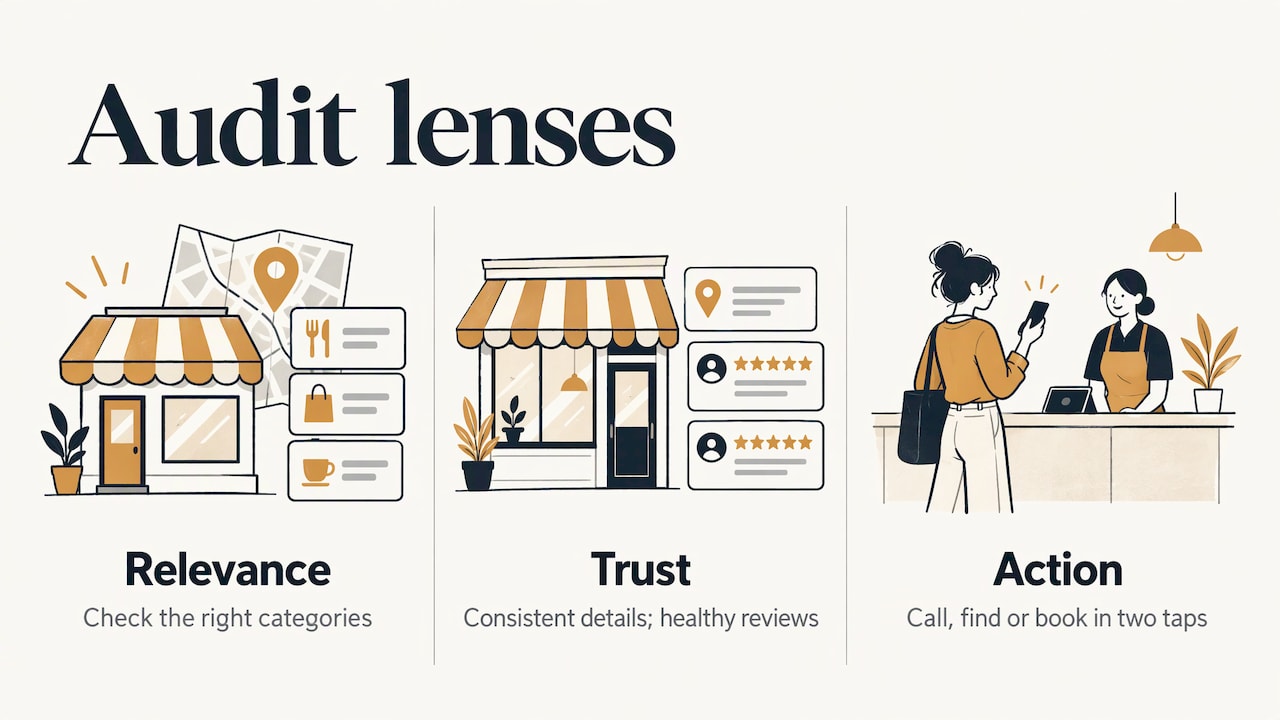
What the audit gives you is a diagnosis. Instead of guessing why a branch does not show up or does not get calls, you inspect relevance (are you in the right categories?), trust (are the details consistent and the reviews healthy?) and action (can a customer call, find you or book in two taps?). Then you decide what to change.
It is not a one-off tidy-up and it is not a guarantee of any position. Nobody can promise you a place in the map pack, and we do not. What an audit does is remove the avoidable reasons for not being there.
Before you start: set up the audit properly
A few habits make the result more reliable.
One location at a time. If you run three clinics or four restaurants, audit each profile separately. Their problems are rarely the same.
View it as a customer. Open the listing in a private or incognito window, on your phone, searching the way a customer would (“dentist near me”, the service plus your neighbourhood). The public view often differs from your dashboard, and that difference is the finding.
Keep a simple record. A spreadsheet with one row per check, the current state, the fix and the date. You will want it for the next audit.
Note two or three competitors. Pick the businesses that appear above you in the map pack for your main search. You are not copying them, you are spotting what the market expects: how many photos, how many reviews, which categories.
The 12-point checklist
1. Ownership and verification
Confirm you can log in as owner or manager and that the profile is verified. If a former agency, an ex-employee or a previous owner still holds ownership, sort it out now. Without control, nothing else on this list can be fixed.
2. Duplicates and ghost listings
Search your business name, your address and your phone number. Moved premises, rebranded or changed a phone number? Old entries can linger. Google’s guidelines say a business should have a single profile, so duplicates should be removed or merged rather than left to compete with the main one. You can read the rule in Google’s guidelines for representing your business.
3. Business name
The name should match the real name of the business as shown on your shopfront, website and stationery. The same guidelines ask for an accurate name that customers recognise. Adding keywords or a slogan to it, for example the city or the service, is the classic mistake, and it can get a profile suspended. Address, opening hours and category belong in their own fields, not in the name.
4. Address, pin and service area
Check three things: the written address, the position of the pin on the map, and whether you show an address at all. Google asks for a correct, precise address or service area. Two cases come up often in Spain:
A virtual office where you do not actually operate cannot have a profile, and a PO box is not accepted as an address, according to the same Google guidelines.
A plumber, electrician or cleaner who visits customers at home should think about the service area rather than a shop address, and define it by the towns or districts they genuinely cover.
A pin placed on the wrong side of a building, or on the next street, sends customers to the wrong door and generates “directions” that never arrive.
5. Phone number and website link
The number should reach a person or a working voicemail, and match the one on your website. The website link should go to the most useful page for that location, not automatically the home page. A multi-branch business is better served by a page per location with its own address, hours and services. If you do not have one, that is a web job worth putting on the list (we cover it in the promo section below).
6. Primary and secondary categories
The primary category is the strongest signal of what you are, and the one that decides which searches you are eligible for. Choose the most specific one that describes your main activity: “Dental clinic” rather than a generic “Health”. Google’s guidance is to pick the minimum number of categories needed to describe your core business. So add secondary categories only for services you truly offer, and remove any that are aspirational or stuffed with extra keywords.
7. Opening hours, including special days
Check regular hours, then the exceptions: bank holidays, August closures, Christmas, local fiestas. A blank day is not the same as “closed”, so mark closed days explicitly. Few things damage trust faster than a customer arriving at a locked door because the profile said you were open.
8. Services, products and attributes
List the services you provide, with short descriptions. For a restaurant, add the menu and attributes such as terrace, accessibility or reservations. For a clinic, list treatments in plain language. Fill in only what is true: attributes you cannot deliver turn into bad reviews.
9. Business description
Use the description to say what you do, where, and for whom, in natural language. It is not the place for offers, phone numbers, links or repeated keywords. Write it for a person who has never heard of you.
10. Photos and videos
Look at what is actually there. Are the cover and logo current? Does the interior, the team and the exterior show what a visitor will find? Generic stock images or photos from five years ago make a profile look abandoned. Add new images regularly and check the ones customers upload, too.
11. Reviews and answers
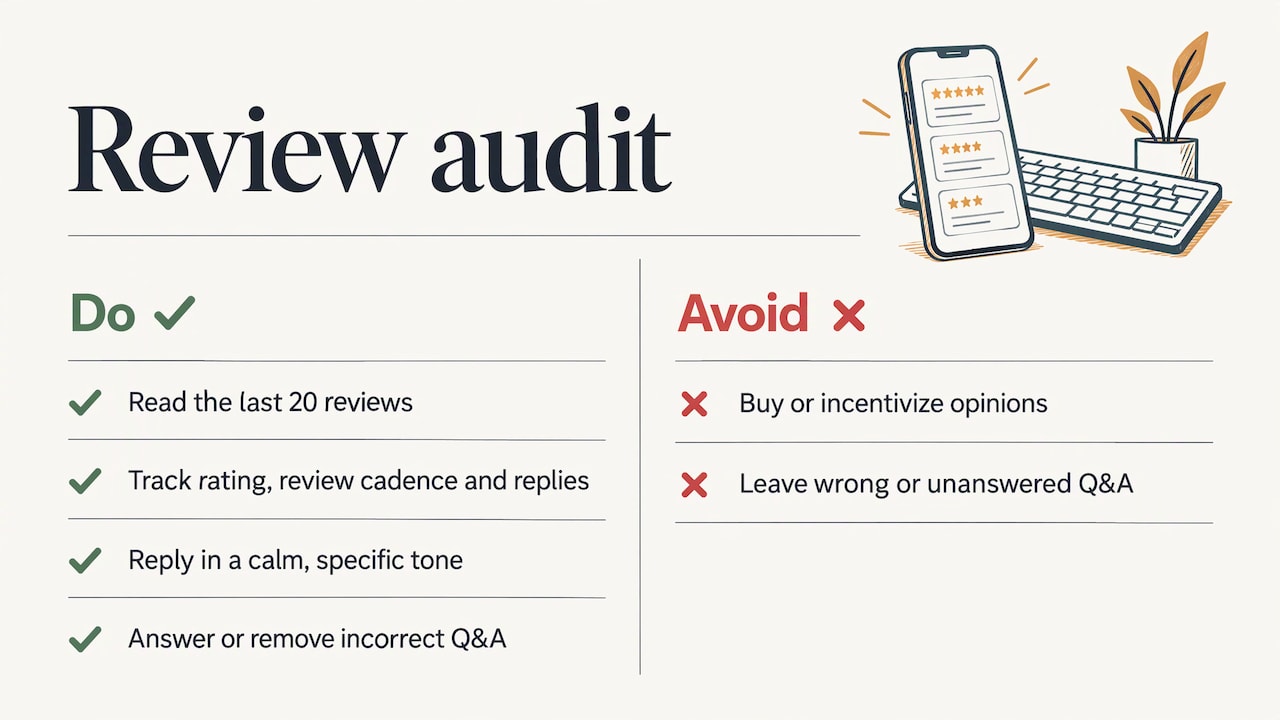
Read your last 20 reviews and note three things: the average rating, how steadily new reviews arrive, and how many you have answered. A steady trickle of recent reviews says more than a burst followed by months of silence. Reply to positive and negative ones in a calm, specific, human tone. If you are tempted to buy or incentivise opinions, read first what that does to your local SEO. Also scan the Q&A or questions area, and answer or remove anything that is wrong or unanswered.
12. Posts, updates and the competitor comparison
Check whether you have posted an update, an offer or an event recently. Then place your profile next to the two or three competitors from your setup list. Count categories, photos, review volume and rating, and look at what they do that you do not. This last step is what turns a list of observations into priorities.
A quick reference table
| Area | What to check | Typical error | Effort |
|---|---|---|---|
| Ownership | Who has owner access | Ex-agency still in control | Low |
| Duplicates | Name, address, phone searches | Old entry after a move | Low to medium |
| Name | Matches shopfront and website | City or service added to the name | Low |
| Address and pin | Precise address, pin, service area | PO box, virtual office, wrong pin | Low to medium |
| Categories | One specific primary, relevant secondary | Generic primary, too many extras | Low |
| Hours | Regular and special days | Holidays missing, blank days | Low |
| Photos | Recency and variety | Old or stock images | Medium |
| Reviews | Rating, pace, replies | Unanswered negatives | Ongoing |
| Website link | Right landing page per location | Home page only | Medium |
Reading your Insights
Once the profile is clean, the data tells you whether it works. Many people search for “Google Business Profile insights” expecting a single score. There is none. What Google gives you is performance data for verified profiles: how many people found you through search and Maps, how many viewed the profile, and what they did, such as calls, direction requests and website clicks. Google explains the metrics in its Business Profile performance help page.
Three points are worth keeping in mind when you read the numbers:
Views count unique visitors. Direction requests are different: Google notes that the figure accounts for multiple taps, cancellations and spam, so treat it as an indication rather than an exact count of people who walked in.
Search terms show the queries people typed when they found your profile. They are updated at the start of each month and can lag by around five days, according to the same help page. So do not draw conclusions from a half-finished month.
Compare like with like. Look at the same months year on year, or the quarter before and after a change. A restaurant in a tourist area will see summer swings that have nothing to do with your edits.
Use search terms as a mini keyword study. If people find you with queries you did not expect, your categories or services may be pulling in the wrong audience, or an opportunity you have not written about. Our guide to choosing the best local keywords shows how to follow that thread.
How to turn findings into a priority list
An audit that ends as a list of 40 observations is not an audit, it is a to-do pile. Sort it in this order:
Errors that cost customers today. Wrong phone, wrong hours, wrong pin, duplicate listings, lost ownership. These are quick and they have the highest return.
Rule violations. A name stuffed with keywords or an address Google does not accept can lead to suspension. Fix them before you add anything.
Relevance. Categories, services, description and the page the website link points to.
Content. Photos, posts and Q&A. Plan a monthly routine rather than a single burst.
Reputation. A system for asking every satisfied customer for a review and answering all of them within a few days.
Competitive gaps. What the businesses above you have that you lack, ranked by how realistic it is to close the gap this quarter.
Assign an owner and a date to each item. For a single-location business, you can usually clear steps 1 to 3 in an afternoon.
How often to audit
Profiles go stale on their own: hours change, staff change, someone suggests an edit, a competitor improves theirs. A sensible pattern for most local businesses is a short monthly check (hours, new reviews, Insights, any suggested edits) and a full audit every quarter, or whenever you move, rebrand, add a service or change phone number. Seasonal businesses, such as hotels, tour operators or beach restaurants, should also audit just before the season opens.
What matters is that the date of the last audit and the findings are written down, so the next one starts from a baseline and you can see whether things moved.
Our perspective
We start every local SEO project with an audit, because the profile is usually the cheapest place to win back visibility. In our experience, owners who feel invisible on the map are rarely missing a miracle. They are missing consistency: the same name, address and phone everywhere, a precise category, answered reviews and a website page that backs up what the profile says.
That is why we treat the profile, the website, the reviews and AI search visibility as one system, not four separate jobs. A tidy profile that links to a weak page wastes its own work. A strong page behind a profile with the wrong category never gets seen.
We do not promise positions, and we would be wary of anyone who does. We commit to the work: what is done, in the contract, each month, with reports you can verify. A good audit is the first example of that. You get a clear list of what was wrong, what we fixed and what comes next.
YellowRock
When it makes sense to get help
A DIY audit will take you a long way, especially on a single location. It becomes harder when you manage several branches, compete in a dense neighbourhood or need the website, reviews and profile to work together. In those cases an outside team saves you the weeks of trial and error. If you want to see how Google ranks local businesses first, our explainer on how Google decides which businesses appear first is a good next read, and the local SEO strategy for Google Maps goes deeper on the work after the audit.
Want us to look at your profile?
We offer a free visibility analysis on Google, with no cost and no commitment, sent through WhatsApp. We check your profile against the points above and against the competitors that show up where you should. If you then want us to do the work, our Plan Crecimiento Inteligente is the entry plan, without a lock-in period, and our Plan Crecimiento Definitivo adds a premium website in three languages over 12 months. You can see everything we do on our services page, or start at yellowrockmarketing.com.

If your website needs to match your profile, our Diseño Web subscription costs 99 € per month.
FAQ
How long does a Google Business Profile audit take?
For one location, a careful manual audit takes roughly one to three hours, including the competitor comparison. Fixing the findings takes longer, since photos and review habits are ongoing work. Multi-branch businesses should audit each location separately.
Is a Google Business Profile audit the same as a listing audit?
In practice, yes. “Listing” is the older word for the profile entry on Maps and Search. A wider listing audit may also include the website page you link to and other directories that repeat your details, but the core checks are the same.
Do I need to be verified to see Insights?
Performance data is available for verified profiles, as Google explains on its performance help page. If you cannot see it, check first that you are a verified owner or manager of the right profile.
Will fixing my profile put me in the top three?
No audit can promise that, and you should be cautious of anyone who says it can. What an audit does is remove errors that hold your profile back and make it easier for Google and customers to understand and trust it. Results depend on your competition, your area and the work you keep up over time.
What should I fix first?
Start with facts that send customers to the wrong place or the wrong time: phone number, hours, address, pin and duplicate listings. They are quick to correct and have an immediate effect. Photos, posts and review routines come next.
Sources
Google Business Profile Help: Guidelines for representing your business on Google
Google Business Profile Help: Understand your Business Profile performance and insights